 Browser-based · Zero surveillance · Privacy-first
AI Quiz Monitor
FormsVault enables you to add browser-level integrity controls to any Google Form quiz — timed sessions, tab switch detection, fullscreen enforcement, no right-click, no copy-paste and one-time submission.
No webcam. No facial scans. No eye tracking. No gaze tracking. No screenshots. No ID or biometrics request. No surveillance.
What is the FormsVault AI Quiz Monitor?
Six browser-level controls that add meaningful integrity to any Google Forms quiz — without requiring anything invasive from respondents.

Timed Assessments
Set a per-form time limit. The countdown begins the moment a respondent opens the form and auto-submits when time expires — no browser refresh tricks.

Tab Switch Detection
Every time a respondent leaves the quiz tab, FormsVault logs it, ensures the user confirms the tab switch/exit, then auto-completes and submits the quiz.

Fullscreen Enforcement
Require respondents to stay in fullscreen mode. Exiting fullscreen is treated the same as a tab switch — configurable per form and flagged, logged, and exited.

Block Right-Click & Copy-Paste
Prevent answers from being copied in or out. Right-click context menus and clipboard shortcuts are suppressed for the duration of the form session.

One-Time Submission
Each form link can only be submitted once per respondent. Re-opening the form after submission displays a completion message — no 2nd attempts.

Form Insights
Every AI monitoring event — tab switch, fullscreen exit, time expiry — is logged with a timestamp in the Form Insights panel alongside the response data.

Built for every assessment context
AI Quiz Monitor works the same whether you're running a L&D training session
for 100 employees or a practice test for 20 learners.

Business and L&D Teams
Certifications, compliance, training, and knowledge assessments

Sales Certification Quizzes
Product & services certification for customer facing teams based on internal requirements, with timed single-submission assessments.

Annual Compliance Tests
Run compliance, safety, and usage policy assessments with fullscreen enforcement and tab switch logging for a clear audit trail.

New Hire Onboarding
New employee onboarding training isn't complete without scheduled and ad hoc learning assessments based on the training material.

Product Knowledge Assessments
Customer-facing teams should demonstrate genuine product knowledge on monitored assessments tied to certification programs.

Post-Training Knowledge Tests
Enable L&D with follow-up assessments that reflect real knowledge retention, and not the ability to Google answers in mid-sentence.

Partner Assessments
Timed and monitored single-submission certification ensures accurate measurement of knowledge quizzes by partners & resellers.

Education & Institutions
Quizzes, tests, and formative assessments

Formative & Summative Assessments
Have the same rigour in Google Form quizzes as physical paper assessments — timed, single-attempt, no reference material visible.

Pop Quizzes with Integrity
Run surprise assessments confident that students can't quickly search for answers in another tab before responding.

Remote & Hybrid Tests
Monitor online exams for distance learners with the same behavioural browser controls used in supervised in-person settings.

Unit & Chapter Tests
Set time limits that match the expected completion time for a student cohort, with tab switch logging as an anti-copying mechanism.

Retake Management
One-time submissions prevents students from comparing answers and retaking Forms-based tests multiple times to gain a better score.

Standardised Skills Assessments
Administer proficiency tests with consistent monitoring controls across the student cohort — no special software, just Google Forms.
Set up AI Quiz Monitor in any Google Form
No separate platform. No learner-side software installation.
Just activate this feature inside the FormsVault Google Forms Add-on when settings up a quiz / assessment / test.
Open FormsVault and start the Quiz builder flow
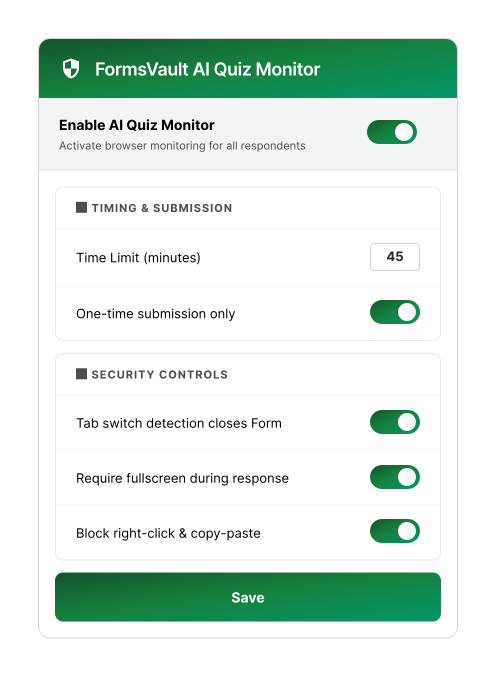
After you setup the inputs for the FormsVault Add-on to build the quiz / assessment / test, you will be shown the AI Quiz Monitor dashboard with the security controls you wish to activate.

Configure your controls
Set your time limit, enable or disable each security control (tab detection, fullscreen, copy-paste blocking), and choose the one-time submission option as required. Hit Save.

Share the Google Form link — AI quiz monitoring is live
Distribute your Google Form link as normal. AI quiz monitoring activates the moment a respondent opens the form. All events are logged and visible in Form Insights alongside the results.
What FormsVault will never do
AI assessment tools that rely on surveillance — webcams, face detection,
ID scans, screen captures — treat respondent privacy as an afterthought.
We believe integrity is achievable without invading anyone's privacy.

No camera takeover or webcam capture
FormsVault never requests, accesses, or activates a respondent's webcam or camera. No video stream is initiated at any point during a monitored session.

No AI face detection or gaze tracking
There is no facial recognition, gaze estimation, eye-tracking, or attention monitoring of any kind. We do not analyse what a respondent is looking at.

No random or timed screen snapshots
FormsVault does not capture, store, or transmit screenshots of a respondent's screen at any point — neither randomly nor on a timed schedule.

No identity capture or user ID requests
We never ask respondents to upload a photo ID, government document, selfie, or any identity verification. Monitoring is behaviour-based, not identity-based.

Our privacy commitment
Al Quiz monitoring events (tab switches, fullscreen exits, time expiry) are logged as metadata against the form response. No response data leaves Google's infrastructure. No biometric data is collected or inferred. No third-party surveillance SDK is loaded. FormsVault Proctor monitors browser behaviour, not human beings.
 GDPRCCPA
Integrity without surveillance
FormsVault occupies the space between "no controls at all" and "full surveillance proctoring".
It's the right tool for the vast majority of workplace and classroom quizzes, tests and assessments.
No proctoring
- Zero friction for respondents
- Tab switching unrestricted
- No time limit enforced
- Re-submissions allowed
- Copy-paste unrestricted
- No audit trail
FormsVault AI Quiz Monitor
- Tab switches logged & flagged
- Timed sessions enforced
- One-time submission lock
- Fullscreen enforcement
- Copy-paste blocked
- Full violation audit log
Surveillance proctoring
- Webcam required
- Face & gaze tracking
- Screen snapshots captured
- Government ID mandated
- Privacy implications
- Privacy compliance complications
Add quiz integrity to every Google Form.
AI Quiz Monitor is included in the FormsVault add-on.
Free plan available. Works with any Google account.
Free tier · Fast plan from $9/month · No webcam · No ID required · GDPR-compatible